
By Erica Tava Johnson, Education Committee Chair and “Learning the Names” Creator
I have a confession. I can spot many mushrooms across the woods, but the Latin names often escape me, and spelling them is hopeless! Take the two-colored bolete: that rosy-red cap over a bright yellow pore surface is hard to miss. But ask me for the Latin and I get brain freeze. Worse, even when I finally nail one down, the ground shifts: those darn names keep changing. The bolete many people learned as Boletus bicolor is now Baorangia bicolor. I worked hard to get better. I relied on my books and field guides, and looked things up on iNaturalist, but no matter what I did, the names didn’t stick.
As foragers we can plateau at visual ID, and it is a comfortable place to be. I wanted the next layer down: why a mushroom is a Pleurotus and not a Hypsizygus, and what the Latin actually tells you. Once you learn the patterns that hold a genus or family together, an unfamiliar mushroom is no longer a complete mystery. You can place it in a group, recognize the traits its relatives share, and reason your way toward an ID instead of starting from nothing. While I was thinking through how to get better at this, I thought, wouldn’t it be great to have something that would just drill me on these names until they stuck? I decided to make one for myself.
How I built it
I am not a programmer, but I happen to be married to one, which helped. Through a good deal of trial and error, I got from a rough first attempt to the version that exists today.
The harder work was the content. Each species meant research: reading across field guides and references, comparing sources where they disagreed, and matching everything back to iNaturalist as the main source of truth. When sources conflicted, I made a call based on my gut and what would be most useful for the app, knowing full well that people will disagree and there was no perfect answer. I tried to cover as many bases as possible. Accuracy was top of mind at all times. That said, I am not under any illusion that everything is perfect.
Common names took their own careful pass. A single mushroom often goes by several names depending on who you learned it from, so I gathered the alternates for each species and the quiz accepts any of them. Get the common name right by any of its names and you are marked correct. Each card also shows the prior and alternate Latin names alongside the current one, so when a name has changed you can see both at once. The bay bolete still reads as the bay bolete, and right there beside Imleria badia you see the Boletus badius you may have learned years ago. Connecting those dots is half the point.
What it is
I built the app as a web page so it would be as accessible and easy to use as possible, from any device. There is nothing to download and no account to set up. You open a link and it works on your phone, tablet, or computer. The current version covers a little over 350 species, chosen based on what shows up most often in our foray logs, what ranks high on iNaturalist for the region, and what I have encountered myself foraging in Minnesota and Wisconsin.
You can try it right now:
https://mushroomflashcards.linkyhost.com
How to use it
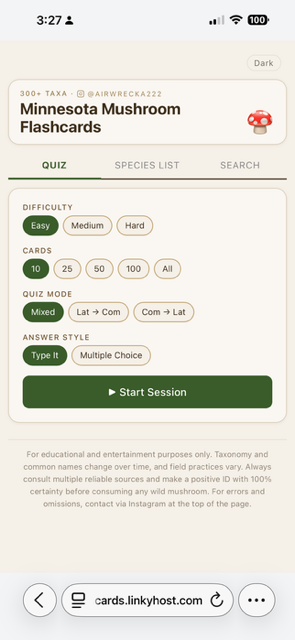
When the page loads you land on the Quiz tab. Before you start a session you pick four things:
- Difficulty: Easy, Medium, or Hard. Easy starts you on the recognizable, common species and Hard pushes you into the look-alikes, species complexes, and genus-level head-scratchers.
- Cards: how long you want the session to be: 10, 25, 50, 100, or All.
- Quiz Mode: Latin to Common shows you the scientific name and asks for the common name. Common to Latin does the reverse, which is the harder direction. Mixed shuffles both so you cannot lean on one crutch.
- Answer Style: Type It to type the name yourself, or Multiple Choice to pick from four options. More on when each one helps below.
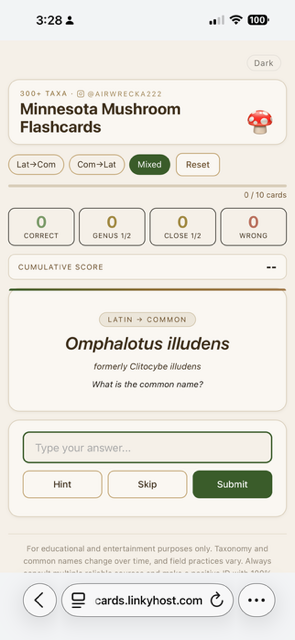
Then you hit Start Session. Each card shows you a name and you answer it in whichever style you chose. In Type It, you type the name and hit Submit, which makes you produce it from memory and spell it correctly. In Multiple Choice, the card gives you four options and you pick one. I added Multiple Choice for people who would rather not type, and for anyone who wants to move faster. It drills the part that matters most early on, recognizing the right name, without making spelling the obstacle, so you can get through far more cards in a sitting. The wrong options are not random. They are pulled from the same family or the same broad form as the correct answer, so choosing well still means telling close relatives apart rather than ruling out nonsense. Recognition first and spelling later is a reasonable way to learn, and you can switch to Type It once the names start to feel familiar. Either way the card tells you how you did, and then you hit Next Card to keep going. Your running score is tracked throughout. If you feel the grading was off or you knew it but typed it wrong, there is also a Mark Correct button that lets you override the result before moving on.
One thing that mattered to me was being generous with grading. I am not a monster! If you get the genus right but miss the species, you get partial credit, because knowing something is a Russula is real progress even if you do not nail down which one. And a close-enough answer still counts, since Latin spelling is hard and a single typo should not wipe out an answer you clearly knew. That grace is deliberate. It keeps you moving instead of giving up after a few harsh misses, while still pushing you toward the exact spelling over time.
Beyond the quiz, there are two other tabs up top: a Species List you can sort and filter, and a Search box for when you just want to look something up.
Light and Dark Mode
In the top corner there is a small button that flips the whole thing between Light and Dark. Light mode is a warm parchment-and-moss palette that I find easy on the eyes indoors. Dark mode is easier on the eyes in low light or at night. By default the app follows whatever your phone is already set to, and the button lets you override it whenever you want. The little mushroom in the header even changes color to match. A small thing, but it makes the app easier to actually keep using.
The part I am proudest of: the notes
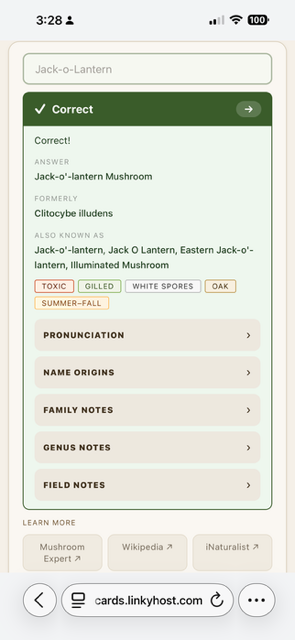
One of the later additions after I got the basics of the flashcard working were the notes, and they really added value and context. When you answer a card, you do not just get a right-or-wrong. You get a set of expandable notes, and this is where the deeper fluency I was after really lives:
- Pronunciation: a plain-English, syllable-by-syllable guide with the stressed syllable in capitals, so you can finally say Agaricus campestris (ah-GAR-ih-kus · kam-PES-tris) out loud without guessing.
- Name Origins: what the Latin actually means, because once you know that campestris means “of the fields,” you start to understand the pattern of where to find it and other traits that help you identify it in the field.
- Genus Notes: these explain what unites a genus, the field characters that define it, the recent DNA-driven name changes, and how to tell it apart from its neighbors. The Agaricus note, for example, walks through the four characters that define the genus and the mandatory scratch-and-smell test that separates the good edibles from the toxic yellow-stainers growing right next to them.
- Family Notes: the wider context, so you start seeing how genera cluster together.
- Field Notes: practical observations for recognizing the species in the woods.
Each card also carries a row of small color-coded chips for quick reference: edibility (edible, caution, toxic, deadly, inedible, medicinal, or unknown), the broad form (gilled, bolete, polypore, tooth, coral, puffball, and so on), spore print color, tree association, and typical season. At a glance they give you useful context and help reinforce patterns as you go.
Each card also carries a short Learn More row that links out for further reading. There is a link to the species on MushroomExpert.com, a link to its Wikipedia entry, and a link to its observations on iNaturalist, where you can see verified finds, regional records, and photographs. When you want to go past the card and dig into the fuller picture of a species, those three links get you there in a tap, without retyping a name you may not yet know how to spell.
Thank you
This did not happen in a vacuum. I want to thank the board for encouraging me to run with an experimental education project, and the several testers who tried early versions and sent me corrections, naming quibbles, and “are you sure about this one?” notes. A particular thank-you to Ariel Bonkoski for taxonomy review and for being patient with my questions. The pronunciation guides were Olena Johnson’s idea, and I am grateful for the suggestion. And thank you to Jaime Rockney for sharing it on her Instagram and helping it reach more people. Every piece of feedback made it sharper and safer.
Please try it and tell me what you think
I would love for more of you to put it through its paces. Use it before a foray, quiz yourself on the drive home, or just poke at the species list and see how many you actually know cold. This is an evolving project, and I expect it to keep changing as Latin names shift, common names get updated, and things I thought were settled turn out to have more nuance or context. Tell me what worked, what did not, what species you wish were in there, and where I got something wrong. You can reach me by email, and corrections are especially welcome.
Drilling the thing you find hard is really the whole point. See you in the woods.
Erica Tava Johnson, MMS Education Chair